Streamlining Software Development: Navigating the CI/CD Pipeline

Continuous integration and continuous deployment (CI/CD) encompasses a suite of principles and tools aimed at facilitating the seamless delivery of software updates to users. By incorporating automation into software development workflows, CI/CD ensures that changes are rolled out promptly, consistently, and securely. This article delves into the necessity and significance of implementing a CI/CD pipeline, offering insights into optimal practices for streamlining the software delivery process.

What is CI & CD?

Continuous integration (CI) is a software development practice where developers frequently merge their code changes into a shared repository, typically multiple times a day. Each integration triggers an automated build and automated tests to detect integration errors quickly. CI helps teams catch and fix bugs early in the development process, ensuring that the software remains stable and functional as new features are added.

Continuous deployment (CD), on the other hand, is the process of automatically deploying code changes to production environments after passing through the CI process. CD enables teams to automate the deployment process, allowing new code changes to be released to users rapidly and consistently. By automating deployment, CD reduces the manual effort required to release updates and helps ensure that changes are delivered to users in a timely and reliable manner.

Benefits of Implementing a CI/CD Pipeline

Early Bug Detection: CI/CD pipelines emphasize thorough testing, which helps identify and fix bugs, errors, or vulnerabilities in the code at an early stage. Automated testing increases test coverage and reduces human error, resulting in higher-quality software with fewer issues, ultimately leading to increased customer satisfaction.

Quick Time to Market: By automating manual tasks like code builds, tests, and deployments, CI/CD pipelines significantly reduce the time developers spend on these tasks. This frees up more time for focusing on adding new features and enhancements, enabling faster delivery of new features to clients and customers.

Enhanced Collaboration and Transparency: Unlike traditional workflows where different departments work in isolation, CI/CD pipelines promote collaboration among development and operations teams. Information like code quality metrics, build results, and errors is readily available, fostering transparency and visibility across teams. This frequent communication ensures alignment with project goals and minimizes miscommunications.

Adaptability and Scalability: CI/CD pipelines can be tailored to meet the unique needs of various software development projects. Customizing the pipeline to suit different project requirements makes it more flexible than traditional workflows. Additionally, scaling the pipeline up or down based on project demands is easier with CI/CD pipelines.

Cost Efficiency: Manual testing and deployment in traditional workflows incur significant time and financial investments. CI/CD pipelines automate much of this process, reducing both the time and financial costs associated with manual testing and deployment. This cost-saving benefit makes CI/CD pipelines a valuable asset for any development team.

Best Practices of CI/CD

Automate Everything: One of the fundamental best practices of CI/CD is to automate every aspect of the software delivery process, including code compilation, testing, and deployment. Automation ensures consistency, repeatability, and speed in the delivery pipeline, reducing manual errors and accelerating the overall development cycle.

Version Control: Effective version control, such as using Git, is crucial for CI/CD pipelines. It enables teams to manage changes to the codebase, collaborate efficiently, and rollback to previous versions if necessary. By maintaining a clear history of changes, version control enhances transparency, accountability, and the ability to trace issues.

Continuous Testing: Continuous testing is a cornerstone of CI/CD best practices. Implementing automated tests at every stage of the pipeline, including unit tests, integration tests, and end-to-end tests, helps detect bugs early, validate changes, and ensure the overall quality of the software. Comprehensive test coverage ensures that any issues are identified and addressed promptly, minimizing the risk of defects in production.

Parallel Execution: Parallel execution involves running multiple tasks simultaneously within the CI/CD pipeline, optimizing resource utilization and reducing overall build times. By parallelizing tasks such as test suites or deployment processes, teams can achieve faster feedback loops and accelerate the delivery of features to users. Parallel execution also enhances scalability, enabling pipelines to handle larger workloads efficiently.

Continuous Monitoring and Feedback: Continuous monitoring and feedback provide valuable insights into the performance and health of applications deployed through the CI/CD pipeline. Integrating monitoring tools and metrics allows teams to identify bottlenecks, track key performance indicators, and proactively address issues in real-time. Regular feedback loops enable continuous improvement, driving iterative enhancements to the delivery process and the overall software product.

A Typical CI/CD Pipeline

Commencing on a software development journey entails navigating through a maze of processes, from code creation to deployment. To simplify this intricate path, Continuous Integration and Continuous Deployment (CI/CD) pipelines serve as indispensable tools. Let’s delve into a blueprint of a typical CI/CD pipeline, designed to streamline the software development lifecycle. (Imge Credit: Jason’s Blog-Beningo)
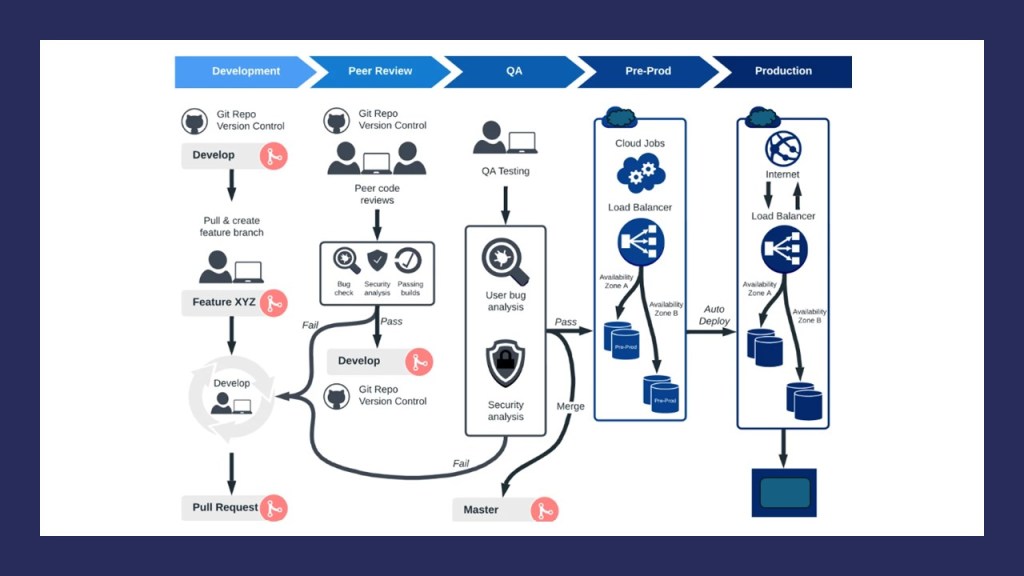
  • Code Management: The journey begins with source code management, where all project packages and dependencies find their home. Establishing a structured review mechanism ensures code integrity, with designated reviewers approving changes via pull requests. Building upon this foundation, the code undergoes compilation and unit testing, crucial for early issue detection and ensuring application functionality.
  • Testing Environment: Transitioning to the testing environment, integration tests play a pivotal role in validating API behavior and adherence to business rules. This phase ensures that APIs fulfill expected functionalities, such as order creation and adherence to predefined constraints. Toggle switches facilitate flexible stage control, enabling seamless progression through the deployment pipeline.
  • 1-Box Deployment: Mitigating deployment risks, the 1-box deployment strategy facilitates controlled testing with a fraction of production traffic. This precautionary measure minimizes the impact of potential issues, allowing swift rollback in case of anomalies. Rollback alarms and bake periods further fortify the deployment process, ensuring stability and resilience.
  • Production Environment: Finally, the journey culminates in the production environment, where the full deployment unfolds. Here, the same safeguards and monitoring mechanisms are in place to uphold performance standards and swiftly address deviations. With a systematic approach and rigorous testing at each stage, the CI/CD pipeline paves the way for smoother, faster, and more reliable software development.

Conclusion

In summary, adopting CI/CD transforms software development by promoting teamwork, improving productivity, and providing smooth user interactions. Following best practices and using automation empower teams to manage deployment challenges effectively, leading to successful software launches and ongoing improvements.
Docker vs. Virtual Machines: The Containerization Conundrum

Docker and virtual machines (VMs) are both integral technologies in application deployment. In the software development lifecycle, deployment involves configuring the application code to be operational for end users.

Definition of Docker

Docker is a containerization platform that allows developers to package applications and their dependencies into lightweight, portable containers. These containers can then be deployed consistently across different environments, from development to production, without the need to worry about differences in underlying infrastructure. Docker provides a standardized way to build, ship, and run applications, enabling greater flexibility, scalability, and efficiency in software development and deployment.

Definition of Virtual Machine (VM)

A Virtual Machine (VM) is an emulation of a physical computer that runs an operating system and applications within a virtualized environment. VMs are created using hypervisor software, which partitions a physical server into multiple virtual machines, each with its own virtualized hardware resources, including CPU, memory, storage, and network interfaces. VMs provide a means to run multiple operating systems and applications on a single physical server, enabling greater server utilization and resource isolation.

Benefits of Docker and Virtual Machnes (VM)

Docker offers several benefits, including lightweight and fast containerization, efficient resource utilization, and improved scalability. Containers share the host operating system kernel, resulting in faster startup times and reduced overhead compared to VMs. Docker containers also consume fewer system resources, making them more efficient in terms of CPU, memory, and storage usage. Additionally, Docker enables easy application scaling and orchestration using tools like Docker Swarm and Kubernetes, allowing organizations to deploy and manage large-scale containerized applications with ease.

Virtual Machines provide benefits such as hardware abstraction, isolation, and compatibility across different operating systems. VMs allow organizations to run multiple applications and operating systems on a single physical server, maximizing server utilization and flexibility. VMs also offer strong isolation between applications, ensuring that issues in one VM do not affect others. Furthermore, VMs support a wide range of operating systems, making them suitable for environments with diverse software requirements.

Key Differences between Docker and Virtual Machines

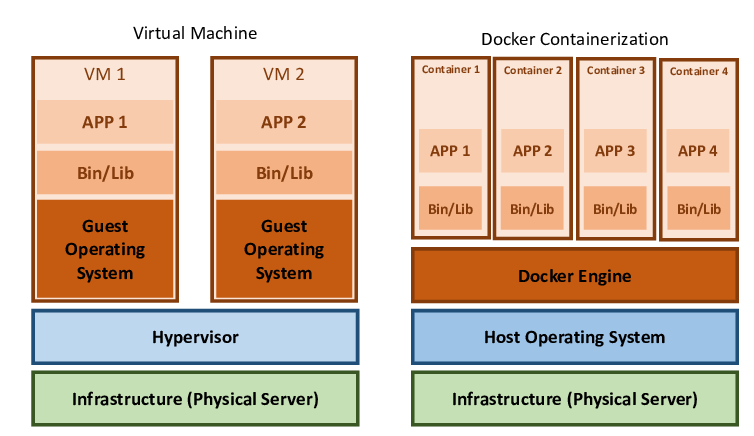
Resource Overhead: Docker containers share the host operating system kernel, resulting in lower resource overhead compared to VMs, which require separate guest operating systems.
Performance: Docker containers offer faster startup times and better performance compared to VMs due to their lightweight nature and shared kernel.
Isolation: While VMs provide strong isolation between applications through virtualization, Docker containers share the host operating system kernel, leading to less isolation.
Portability: Docker containers are more portable than VMs, as they encapsulate both the application and its dependencies, allowing for consistent deployment across different environments.
Management: Docker containers are easier to manage and orchestrate at scale using container orchestration tools like Docker Swarm and Kubernetes, whereas VM management can be more complex.

Similarities between Docker and Virtual Machines

Both Provide Application Isolation: Both Docker containers and VMs provide a level of isolation for applications, ensuring that they do not interfere with each other.
Both Support Multiple Environments: Both Docker and VMs can be deployed across various environments, including development, testing, and production.
Both Enable Flexibility in Deployment: Docker containers and VMs allow for flexible deployment of applications, enabling organizations to adapt to changing business requirements.

When to Use Docker & Virtual Machies

Docker is ideal for microservices-based architectures, cloud-native applications, and containerized workloads where scalability, portability, and efficiency are paramount. It is well-suited for environments requiring rapid deployment, continuous integration/continuous deployment (CI/CD), and DevOps practices.

Virtual Machines are suitable for environments with diverse operating system requirements, legacy applications, and applications requiring strong isolation. VMs are also useful for environments where compatibility with different operating systems is necessary or when running multiple applications on a single physical server.

In conclusion, the choice between Docker containers and Virtual Machines hinges on the specific requirements and objectives of the deployment environment. While Docker offers lightweight and efficient containerization, ideal for modern microservices architectures and cloud-native applications, Virtual Machines provide robust isolation and compatibility across diverse operating systems, making them suitable for legacy applications and environments with varied software requirements. Understanding the key differences and similarities between Docker and VMs is essential for organizations to make informed decisions about their infrastructure and application deployment strategies. By leveraging the strengths of each technology appropriately, businesses can optimize their resource utilization, enhance scalability, and streamline their software development and deployment processes for greater efficiency and agility in today’s dynamic IT landscape.

Observability – What is it? Aspects, Benefits, and Trends

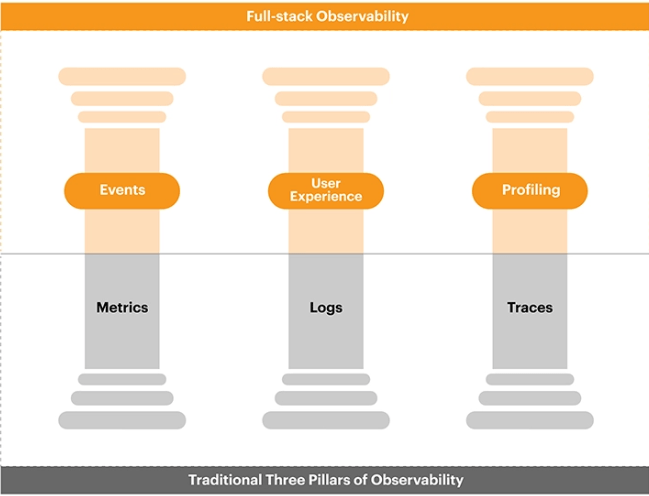
Observability refers to the ability to understand and infer the internal state of a system based on its external outputs. In simpler terms, it’s about gaining insights into how a system behaves and performs by observing its outputs, such as logs, metrics, and traces. Unlike monitoring, which focuses on collecting data passively, observability emphasizes active exploration and understanding of system behaviors. It involves collecting and analyzing diverse data sources to provide a comprehensive view of system health, performance, and behavior. Observability relies on telemetry data, which includes metrics for quantifiable measurements, logs for detailed event information, and traces for understanding transaction flows across distributed systems. By correlating and analyzing these data sources, observability enables engineers to diagnose issues, troubleshoot problems, and optimize system performance effectively.

The benefits of observability are manifold. Firstly, it enhances system reliability by providing real-time insights into system behavior and performance anomalies, allowing engineers to proactively identify and address issues before they escalate. Secondly, observability facilitates faster incident response and resolution by enabling engineers to pinpoint the root cause of problems accurately. Thirdly, it supports efficient capacity planning and resource optimization by providing visibility into resource utilization trends and performance bottlenecks. Some of the most important use cases of observability include monitoring microservices architectures, troubleshooting distributed systems, optimizing cloud infrastructure performance, and ensuring application reliability in dynamic environments.

Implementing observability involves several key steps. Firstly, organizations need to instrument their systems to collect relevant telemetry data, including logs, metrics, and traces. This often involves integrating observability tools and libraries into applications and infrastructure components. Secondly, organizations must centralize and aggregate telemetry data from across their distributed systems to gain a unified view of system behavior. This may involve deploying observability platforms or using cloud-based monitoring services. Finally, organizations need to analyze and visualize telemetry data effectively to derive actionable insights and drive informed decision-making. This may involve leveraging advanced analytics techniques, machine learning algorithms, and visualization tools to extract meaningful patterns and trends from telemetry data.

Observability is also becoming integral to DevOps practices, where it plays a crucial role in enabling continuous monitoring, feedback, and improvement throughout the software development lifecycle. In DevOps, observability tools and practices facilitate rapid detection and resolution of issues, streamline deployment pipelines, and optimize application performance. Examples of observability tools in DevOps include monitoring and logging solutions like Prometheus, Grafana, ELK Stack (Elasticsearch, Logstash, Kibana), which provide insights into application performance, infrastructure metrics, and logs, helping DevOps teams identify bottlenecks, troubleshoot issues, and improve overall system reliability and resilience.

Future trends in observability are poised to revolutionize the way organizations manage and monitor their systems, with a significant focus on automation and intelligence. Artificial Intelligence (AI) and Machine Learning (ML) will play a pivotal role in this evolution, enabling advanced analytics and predictive capabilities. AI/ML algorithms can analyze vast amounts of telemetry data to identify patterns, anomalies, and trends that might elude manual analysis. By leveraging AI-driven anomaly detection and forecasting, organizations can proactively identify and address potential issues before they impact system performance or reliability. Moreover, AI-powered incident response and remediation processes can automate the resolution of common issues, reducing the burden on human operators and minimizing downtime.

In the realm of multi-cloud and hybrid cloud environments, observability solutions will need to adapt to the complexities of managing distributed architectures across multiple cloud providers. Organizations increasingly rely on a mix of public cloud, private cloud, and on-premises infrastructure, making it challenging to gain a unified view of system health and performance. Observability tools tailored for multi-cloud environments will enable organizations to aggregate and analyze telemetry data from disparate sources, providing comprehensive insights into system behavior across the entire hybrid infrastructure. Examples of tools and services in this trend include cloud-native monitoring platforms like Datadog, New Relic, and Dynatrace, which offer support for multi-cloud environments and provide centralized visibility and analytics capabilities.

The proliferation of edge devices, driven by trends such as the Internet of Things (IoT) and edge computing, presents new challenges and opportunities for observability. Edge devices operate in diverse and often resource-constrained environments, making traditional monitoring approaches insufficient. Observability solutions for edge computing must be lightweight, scalable, and capable of processing telemetry data locally to provide real-time insights and enable proactive management. Tools like AWS IoT SiteWise, Azure IoT Hub, and Google Cloud IoT Core offer capabilities for monitoring and managing edge devices, providing visibility into device performance, health, and security metrics.

In conclusion, observability is becoming increasingly crucial in modern software engineering practices, particularly in the context of distributed, cloud-native architectures. As systems become more complex and dynamic, the ability to understand and troubleshoot system behavior in real-time becomes paramount.

Unlocking Operational Efficiency: Cloud Orchestration

Introduction

Cloud orchestration refers to the coordination and management of multiple cloud services and resources, often across various cloud environments (such as public, private, or hybrid). It involves automating the setup, configuration, deployment, and management of these services to ensure that they work together seamlessly and efficiently.

At its core, cloud orchestration aims to

  • Automate repeated processes to minimize manual intervention and errors
  • Ensure consistent configurations across various environments
  • Scale resources up or down based on demand
  • Improve resource utilization to save costs
  • Streamline workflows for faster development and deployment cycles

Example

Consider a scenario where a company deploys applications across multiple cloud providers. Without orchestration, manual setup and management tasks are time-consuming and error-prone. With cloud orchestration, automated workflows handle deployment, scaling, security, and data management tasks seamlessly across different cloud platforms.

A single orchestration tool would allow them to

  • Deploy an application across AWS, Azure, and Google Cloud using a pre-defined template.
  • Automatically scale the number of servers up during peak traffic times and down when traffic is low.
  • Apply consistent security policies and updates across all environments without manual intervention.
  • Manage data backups and disaster recovery processes across different cloud platforms.

Future Roadmap Planning

The future of cloud orchestration includes several anticipated trends:

  1. Multi-Cloud and Hybrid-Cloud Strategies: As organizations continue using multiple cloud environments, orchestration tools will evolve to manage complex deployments more efficiently.
  2. Integration with AI and Machine Learning: Cloud orchestration will likely incorporate AI to predict and manage scaling requirements and to optimize resource utilization.
  3. Enhanced Security and Compliance: Orchestration tools will include more sophisticated security features for monitoring and enforcing compliance across clouds.
  4. Serverless and Container Orchestration: The rise of serverless functions and containerized applications will see orchestration tools focus more on these technologies for seamless management.
  5. Edge Computing: As edge computing grows, cloud orchestration will extend to manage workloads on edge devices and integrate those with central cloud services.
  6. User-Friendly Orchestration: Tools will become more user-friendly, allowing non-technical users to automate and orchestrate cloud services without detailed technical knowledge.
  7. Sustainability: Efficiency in resource utilization will not only be a cost-saving factor but also contribute to sustainability, as orchestration can reduce the overall carbon footprint of cloud computing.

Top Cloud Orchestration Tools

Here are some of the best cloud orchestration tools and services available in the market

  1. Terraform – An open-source infrastructure as code software tool created by HashiCorp. It enables users to define and provide data center infrastructure using a declarative configuration language.
  2. Kubernetes – An open-source container orchestration tool designed to automate deploying, scaling, and operating application containers.
  3. Ansible – An open-source automation platform by Red Hat, it’s simple to use for automating cloud provisioning, configuration management, application deployment, intra-service orchestration, and many other IT needs.
  4. AWS CloudFormation – A service provided by Amazon Web Services that gives developers and businesses an easy way to create a collection of related AWS and third-party resources, and provision and manage them in an orderly and predictable fashion.
  5. Microsoft Azure Resource Manager – A management layer that allows you to deploy, update, and manage your Azure services as a group, rather than managing these services individually.
  6. Google Cloud Deployment Manager – An infrastructure management service that automates the creation and management of Google Cloud resources. Write templates and configurations, and let Deployment Manager make API calls to create resources on your behalf.
  7. OpenStack Heat – The main project in the OpenStack orchestration program. It implements an orchestration engine to launch multiple composite cloud applications based on templates in the form of text files that can be treated like code.
  8. VMware vRealize Automation – It simplifies the automation of complex IT tasks and integrates with VMware vSphere and other virtualization technologies to manage multi-cloud environments.
  9. SaltStack – Now known as Salt, is a Python-based, open-source configuration management software and remote execution engine. It supports the “Infrastructure as Code” approach to deployment and cloud management.
  10. Chef Automate – Provides a full suite of enterprise capabilities for node visibility and compliance, and integrates with the Chef ecosystem to automate infrastructure and application workflows.
  11. Puppet Enterprise – An IT automation software that automates provisioning, configuration management, and application deployment of an infrastructure.

Each of these tools has its strengths and is suited for different types of infrastructure and organizational requirements. The choice of the right tool depends on compatibility with existing systems, the scale of operations, the expertise of the IT staff, and specific features that align with the company’s needs and goals. It’s also common for organizations to use a mix of these tools to meet different aspects of their cloud orchestration needs.

Conclusion

In conclusion, cloud orchestration is at the heart of operational efficiency in cloud environments. As cloud technologies continue to evolve, orchestration tools and practices will likewise advance, driving automation, optimization, and integration across increasingly complex cloud ecosystems.

Edge-Driven Evolution: Embracing IaC, GitOps, and Cloud-Native Architectures for Next-Gen Infrastructure Management

The next evolution in the space of application deployment and infrastructure management is likely to be driven by the adoption of Infrastructure as Code (IaC) and GitOps practices. Gartner and other industry experts are increasingly recommending these approaches to improve agility, consistency, and reliability in managing infrastructure and deploying applications.

Infrastructure as Code (IaC) involves managing and provisioning infrastructure using code and automation tools, treating infrastructure as software. With IaC, infrastructure configurations are defined in code, which can be version-controlled, tested, and deployed using automation tools like Terraform, AWS CloudFormation, or Azure Resource Manager.

GitOps extends the principles of IaC by leveraging Git repositories as the source of truth for infrastructure and application configurations. Changes to infrastructure or application code are made through Git commits, triggering automated pipelines for testing, validation, and deployment. This ensures consistency, transparency, and traceability in the deployment process.

The adoption of IaC and GitOps represents a shift towards more declarative and immutable infrastructure management paradigms, where infrastructure and application configurations are defined in a declarative manner and changes are applied through automated processes, ensuring consistency and reducing the risk of configuration drift.

Additionally, there is a growing focus on multi-cloud and hybrid cloud environments, where organizations leverage multiple cloud providers or a combination of on-premises and cloud infrastructure to meet their diverse needs. Technologies and platforms that enable seamless management and orchestration across these environments are gaining traction.

Furthermore, advancements in containerization and Kubernetes orchestration are driving the adoption of cloud-native application architectures, where applications are packaged into containers and orchestrated dynamically using Kubernetes. This enables organizations to build, deploy, and scale applications more efficiently and consistently across different environments.

In summary, the next technology evolution in application deployment and infrastructure management is likely to be driven by the adoption of Infrastructure as Code (IaC), GitOps practices, multi-cloud and hybrid cloud environments, and cloud-native architectures. These approaches enable organizations to achieve greater agility, scalability, and reliability in managing their infrastructure and deploying applications in today’s dynamic and diverse IT landscape.

Leveraging Salesforce CRM Platform as a Service (PaaS) for Enhanced Business Efficiency

Salesforce CRM Platform as a Service (PaaS) offers a robust and versatile framework for businesses to streamline their customer relationship management processes. This article explores the features, benefits, and implementation strategies of Salesforce CRM PaaS, highlighting its potential to drive business growth and enhance customer satisfaction.

In today’s competitive business landscape, effective customer relationship management (CRM) is essential for sustained success. Salesforce CRM Platform as a Service (PaaS) provides businesses with a powerful toolset to manage customer interactions, improve sales efficiency, and boost overall productivity. This white paper aims to delve into the various aspects of Salesforce CRM PaaS and demonstrate its value proposition for organizations across industries.

Overview of Salesforce CRM PaaS:

Salesforce CRM PaaS is a cloud-based platform that enables businesses to build, customize, and deploy CRM solutions tailored to their unique needs. Key components of the Salesforce CRM PaaS ecosystem include:

  1. Lightning Experience: A modern and intuitive user interface that enhances productivity and streamlines navigation.
  2. Salesforce Einstein: Artificial intelligence capabilities that deliver predictive insights, automate tasks, and drive smarter decision-making.
  3. AppExchange: An extensive marketplace offering a wide range of third-party apps and integrations to extend the functionality of Salesforce CRM.
  4. Salesforce Mobile App: Enables access to CRM data and functionality on-the-go, empowering sales teams to stay productive from anywhere.

Benefits of Salesforce CRM PaaS

Implementing Salesforce CRM PaaS offers numerous benefits for businesses, including

  1. Scalability: Salesforce CRM PaaS is highly scalable, allowing businesses to adapt and grow without the need for significant infrastructure investments.
  2. Customization: The platform offers extensive customization options, enabling businesses to tailor CRM solutions to their specific requirements and workflows.
  3. Integration: Salesforce CRM PaaS seamlessly integrates with other business systems and applications, facilitating data sharing and improving cross-functional collaboration.
  4. Analytics: Advanced analytics and reporting capabilities provide valuable insights into customer behavior, sales performance, and business trends, empowering organizations to make data-driven decisions.
  5. Automation: Salesforce CRM PaaS automates repetitive tasks and processes, freeing up valuable time for sales teams to focus on building relationships and driving revenue.
  6. Security: Built-in security features and compliance certifications ensure the protection of sensitive customer data and regulatory compliance.

Implementation Strategies

Successful implementation of Salesforce CRM PaaS requires careful planning and execution. Key strategies for a successful deployment include

  1. Needs Assessment: Conduct a thorough analysis of business requirements and objectives to determine the scope and customization needs of the CRM solution.
  2. Stakeholder Engagement: Engage key stakeholders, including sales, marketing, and customer service teams, throughout the implementation process to ensure alignment and buy-in.
  3. Training and Adoption: Provide comprehensive training and support to users to facilitate adoption and maximize the benefits of the Salesforce CRM PaaS platform.
  4. Data Migration: Develop a robust data migration strategy to ensure seamless transition of existing CRM data to the Salesforce platform, minimizing disruption and data integrity risks.
  5. Continuous Improvement: Implement a process for ongoing monitoring, feedback collection, and system optimization to continuously enhance the effectiveness of the CRM solution.

Salesforce CRM Platform as a Service (PaaS) offers a powerful and flexible solution for businesses seeking to streamline their CRM processes and drive business growth. By leveraging the features and capabilities of Salesforce CRM PaaS, organizations can enhance customer satisfaction, improve sales efficiency, and gain a competitive edge in today’s dynamic marketplace. With careful planning, execution, and ongoing optimization, Salesforce CRM PaaS can serve as a catalyst for success and innovation across industries.

Cloud Computing Services IaaS, PaaS, & SaaS: Choice for Your Business

Cloud Computing and Service Models

Cloud computing revolutionizes IT infrastructure by delivering computing resources over the internet. Three primary service models—Infrastructure as a Service (IaaS), Platform as a Service (PaaS), and Software as a Service (SaaS)—offer varying degrees of control and management, catering to different business needs.

What is IaaS (Infrastructure as a Service)?

IaaS provides virtualized computing resources, including compute, storage, and networking, over the internet. It offers on-demand scalability, allowing businesses to adjust resources based on workload requirements. Compared to on-premise solutions, IaaS offers benefits such as cost savings (no upfront hardware investments), scalability, and flexibility. Major players in IaaS include Amazon Web Services (AWS), Microsoft Azure, and Google Cloud Platform (GCP).

What is PaaS (Platform as a Service)?

PaaS offers a platform for developers to build, deploy, and manage applications without the complexity of underlying infrastructure. It provides software, hardware, and IoT support, streamlining application development and deployment. Compared to on-premise solutions, PaaS offers advantages such as faster time-to-market, reduced development costs, and scalability. Major players in PaaS include Microsoft Azure, Salesforce CRM Platform, Google Cloud Platform, and IBM Cloud.

What is SaaS (Software as a Service)?

SaaS delivers ready-to-use software applications over the internet, eliminating the need for installation and maintenance. It offers accessibility and scalability, enabling businesses to access applications from anywhere with an internet connection. Compared to on-premise solutions, SaaS offers benefits such as lower total cost of ownership (TCO), automatic updates, and simplified management. Major players in SaaS include Salesforce, Microsoft 365, and Google Workspace.

The Business Choice

Choosing the right cloud computing service model depends on your business requirements, technical expertise, and budget constraints. For businesses seeking full control over infrastructure and applications, IaaS provides flexibility and scalability while offering cost savings compared to on-premise solutions. PaaS is ideal for organizations focusing on application development and deployment, offering faster time-to-market and reduced development costs. SaaS offers convenience, accessibility, and lower TCO, making it suitable for businesses looking for ready-to-use software solutions. Ultimately, evaluating use cases, benefits, and major players can help businesses make informed decisions in adopting cloud computing services.

Harnessing the Power of Containers

Introduction to Containers

Containers revolutionized software development by providing a lightweight, portable, and efficient solution for deploying applications. They were introduced by Docker in 2013, although the concept of containerization traces back to earlier technologies like BSD Jails and Solaris Containers. Unlike traditional virtualization, which involves running multiple operating systems on a single physical machine, containers share the host operating system’s kernel, leading to higher resource utilization and faster startup times.

Advantages of Containers

Containers offer numerous benefits, making them increasingly popular in modern software development. They provide a consistent environment across different platforms, simplifying the deployment process and minimizing compatibility issues. Containers are highly portable, enabling developers to package applications and dependencies into a single unit that can run anywhere, from a developer’s laptop to a production server. This portability fosters a seamless development and deployment pipeline, enhancing collaboration and agility. Furthermore, containers are lightweight and resource-efficient, allowing for rapid scaling and efficient resource utilization.

Containers in Edge Computing

In edge computing, containers play a crucial role in enabling efficient and scalable deployment of applications at the edge. By leveraging containerization, organizations can achieve greater security, reliability, and portability in edge deployments. Organizations can utilize containers at the edge to deploy services closer to end-users, reducing latency and improving overall performance. Containers also facilitate easier management of edge environments, enabling automated deployment and scaling of applications across distributed edge nodes. Additionally, containerization enhances security by isolating applications and their dependencies, minimizing the attack surface and mitigating potential risks.

Challenges of Containerization at the Edge

While containers offer significant advantages, their adoption at the edge presents unique challenges. Storage challenges arise due to limited storage capacity at edge locations, requiring efficient management of container images and data. Low-bandwidth networks pose another challenge, impacting the speed and reliability of container deployments and updates. Container orchestration at the edge becomes more complex, as edge environments typically consist of heterogeneous hardware and network configurations. Moreover, improving container technology on Real-Time Operating Systems (RTOS) is essential to meet the stringent performance requirements of edge applications.

Conclusion

Operating containers at the edge presents both opportunities and challenges for organizations seeking to harness the full potential of edge computing. While containers offer benefits such as portability, scalability, and security, addressing challenges like storage constraints and network limitations requires innovative solutions and technological advancements. As the edge computing landscape continues to evolve, collaboration between industry stakeholders and ongoing innovation will be key to overcoming these challenges and unlocking the transformative potential of edge computing.

Decoding Cloud Architecture: Unveiling the Blueprint of Digital Transformation

Introduction

Cloud architecture is the meticulously crafted blueprint that orchestrates the digital transformation journey for businesses. It encompasses the arrangement of cloud components, services, and infrastructure to create a seamless, scalable, and efficient environment. Understanding the nuances of cloud architecture is pivotal, as it lays the foundation for harnessing the full potential of cloud computing technologies.

Importance of Cloud Architecture

Cloud architecture is paramount for several reasons. Firstly, it provides a structured approach to managing and optimizing resources, ensuring efficient utilization and cost-effectiveness. Secondly, it facilitates scalability, enabling businesses to seamlessly expand or shrink their operations based on demand. Moreover, cloud architecture promotes agility by allowing rapid deployment and updates, fostering innovation and responsiveness to market changes.

Let us break into the details to understand this better

Cloud Computing: A Comprehensive Deep Dive

Cloud computing is a transformative paradigm in the realm of information technology, revolutionizing the way businesses and individuals access, store, process, and manage data. At its core, cloud computing involves the delivery of computing services over the internet, allowing users to access a shared pool of resources, including servers, storage, networking, databases, analytics, software, and more. This comprehensive deep dive will explore the key components, service models, deployment models, and the myriad benefits that make cloud computing a cornerstone of the digital age.

Service model of Cloud Computing:

Infrastructure as a Service (IaaS):
Infrastructure as a Service (IaaS) delivers virtualized computing resources via the internet, allowing users to rent virtual machines, storage, and networking components while retaining control over applications, data, runtime, middleware, and the operating system.

Platform as a Service (PaaS):
Platform as a Service (PaaS) simplifies application development by offering a platform for developers to build, deploy, and manage applications without managing the underlying infrastructure. This streamlines the development process, allowing users to concentrate on coding rather than infrastructure concerns.

Software as a Service (SaaS):
Software as a Service (SaaS) provides software applications over the internet, granting users access without the need for installation or maintenance. This model eliminates the requirement for local installations, offering convenient and accessible software solutions.

Serverless:
Serverless computing represents a progression in cloud technology, shifting the focus from infrastructure management to code execution. In this paradigm, organizations are relieved of the burden of handling infrastructure decisions, placing the responsibility in the hands of cloud service providers. Serverless architectures exhibit exceptional scalability and operate on an event-driven model, activating resources only in response to specific functions or triggers. When implemented effectively, this approach can result in significant time and cost savings for organizations.

In terms of Cloud Computing structures, the Public Cloud involves shared resources among multiple users over the internet, providing a cost-effective and scalable solution suitable for various applications. On the other hand, the Private Cloud offers dedicated resources for a single organization, either on-premises or hosted by a third-party provider, ensuring enhanced security and control. The Hybrid Cloud combines elements of both public and private clouds, offering flexibility and optimization while enabling data and application portability.

Benefits of Cloud Computing

  • Resources can be scaled up or down based on demand, ensuring optimal performance.
  • Eliminates the need for upfront investments in hardware and infrastructure. Pay-as-you-go pricing models contribute to cost optimization.
  • Enables remote access to resources, fostering collaboration and flexibility.
  • Cloud providers often have multiple data centers, ensuring redundancy and high availability.
  • Cloud providers invest heavily in security measures, often surpassing the capabilities of individual organizations.
  • Accelerates innovation by providing instant access to cutting-edge technologies and services.

Cloud Computing Architecture can be categorized into two fundamental layers: the front-end and the back-end. These layers are complemented by essential elements such as networking, automation, and security. In more intricate architectures, additional layers are introduced, resulting in a multi-tiered structure with multiple components between the front end and the back end.

Exploring these components in greater detail:

Front-End
Front-End is the user-facing component of the architecture responsible for the user interface and experience, including interfaces like web browsers and mobile applications. It facilitates user input collection and transmission to the back-end for processing.

Back-End
Back-End represents the server-side of the architecture, housing data processing, storage, and application logic. Comprising servers, databases, and application servers, it handles user requests, executes application logic, and manages data storage.

Networking
Networking is crucial for facilitating communication between the front-end and back-end. It involves protocols, data transmission methods, and network infrastructure, ensuring seamless connectivity and efficient data transfer.

Application
Application refers to the software or program that performs specific functions for end-users, such as word processors or web browsers. It interacts with the user interface and processes user input.

Service
Services play a pivotal role in the cloud environment, offering a flexible and scalable approach to meet varying computing needs. Users can leverage these services to optimize resource utilization, reduce upfront investments, and enhance overall operational efficiency. The concept of services in cloud computing reflects the paradigm shift from traditional on-premises infrastructure management to a more dynamic and on-demand model.

Storage
Storage involves the component responsible for storing and retrieving data. It includes databases, file systems, and other storage mechanisms crucial for data persistence and accessibility.

Management
Management encompasses the tools and processes used to oversee and control various components within the cloud architecture. It includes resource allocation, monitoring, and optimization to ensure efficient operation.

Security
Security is integral for safeguarding data, applications, and infrastructure from unauthorized access and cyber threats. It incorporates encryption, authentication, access controls, and monitoring to ensure a secure computing environment, crucial for maintaining resource confidentiality, integrity, and availability.

Automation
Automation involves the use of automated processes and workflows to enhance efficiency, including tasks like resource provisioning and system management. Automation contributes to agility and responsiveness.

As cloud computing architectures evolve, understanding the intricacies of these components becomes paramount for effectively designing, deploying, and managing robust cloud-based solutions. Cloud computing stands as a linchpin in the digital transformation journey, offering unprecedented flexibility, efficiency, and innovation. As businesses and individuals continue to navigate the digital landscape, embracing the cloud is not merely an option but a strategic imperative to stay agile, competitive, and resilient in the dynamic world of technology.

Navigating the Tech Terrain: Cloud Computing vs. Edge Computing in Data Analytics

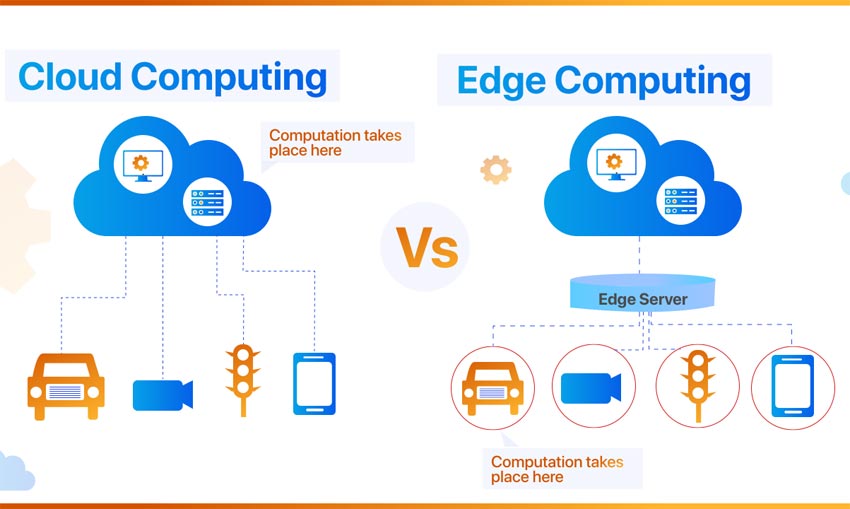
Cloud Computing and Edge Computing are two paradigms that address the processing and storage of data in different ways, each with its own set of advantages and use cases.

Cloud Computing: Cloud Computing involves the centralized processing and storage of data in remote servers, commonly referred to as the “cloud.” This model allows users to access computing resources and services over the internet. Examples include Amazon Web Services (AWS), Microsoft Azure, and Google Cloud Platform. Cloud computing is well-suited for applications with high computational needs, such as complex data analysis, machine learning, and large-scale data storage. It provides scalability, flexibility, and cost-effectiveness by allowing users to pay only for the resources they use.

Edge Computing: Edge Computing, on the other hand, involves processing data closer to the source of generation, typically at or near the edge of the network. This reduces latency and enhances real-time processing, making it ideal for applications where immediate data analysis is crucial, like IoT devices, autonomous vehicles, and industrial automation. Edge computing minimizes the need to transmit large volumes of data to centralized cloud servers, leading to faster response times and improved efficiency.

Data Analytics in Both Models: In the context of data analytics, Cloud Computing is often leveraged for large-scale, batch processing tasks. For instance, analyzing massive datasets or training machine learning models might be more efficiently done in the cloud. Edge Computing, on the other hand, is advantageous for real-time analytics, where data needs to be processed instantly, like monitoring and responding to sensor data in smart cities.

Importance of Knowing the Difference: Understanding the difference between Cloud and Edge Computing is crucial for businesses and developers when designing their technology infrastructure. It helps in selecting the most suitable architecture based on the specific requirements of the application. While cloud computing offers centralized power and resources, edge computing provides agility and reduced latency. Striking the right balance or even combining both approaches, known as edge-to-cloud architecture, is becoming increasingly important as technology advances.

Leaders in Edge Computing: Prominent players in the edge computing space include Aarna Networks, ADLINK, EdgeConneX. ClearBlade, Dell Technologies, and Cisco.

Leaders in Cloud Computing: Major players in the cloud computing industry are Amazon Web Services (AWS), Microsoft Azure, Google Cloud Platform (GCP), IBM, Oracle, and Alibaba.

Being aware of these distinctions empowers organizations to make informed decisions about where to process and store their data, optimizing performance and efficiency based on their specific needs and use cases.

Navigating the IT Landscape: Inside-Out vs. Outside-In Paradigm

In the rapidly evolving realm of enterprise IT and data centers, the age-old metaphor of inside-out versus outside-in has taken on new significance. Traditionally, enterprises focused on building robust internal infrastructures, an inside-out approach that emphasized on-premise data centers and extensive virtualization. However, with the rise of cloud-native offerings, there’s a paradigm shift towards the outside-in approach, emphasizing the adoption of scalable, flexible, and efficient cloud solutions.

From an enterprise perspective, the inside-out model has long been synonymous with stability and control. Virtualization technologies allowed companies to consolidate servers, optimize resource usage, and maintain a grip on their IT environments. On the other hand, the outside-in model, exemplified by cloud-native solutions like containers, offers agility and scalability. Startups and small businesses, often resource-constrained, find this model appealing as it allows them to scale rapidly without significant upfront investments in infrastructure.

Choosing between Virtualization and Containers: Success Stories and Cautions

Success stories abound for both virtualization and containerization. Virtualization giants like VMware have enabled enterprises to achieve greater efficiency and resource utilization. However, caution is advised as over-virtualization can lead to increased complexity and costs. On the other hand, containerization success stories, such as those from companies embracing Kubernetes, highlight the speed and scalability achieved through container orchestration. Nonetheless, adopting containers requires a shift in mindset and careful consideration of application architecture.

Words from Tech Leaders: Navigating the Cloud Frontier

Tech leaders have recognized the significance of this shift. Satya Nadella, CEO of Microsoft, emphasizes, “The world is becoming a computer, and computing is becoming embedded in the world.” Sundar Pichai, CEO of Google, notes, “Cloud computing is fundamental to the future of AI.” These quotes reflect the industry’s acknowledgment of the transformative power of the cloud and the need for businesses, whether large enterprises or nimble startups, to carefully navigate the evolving IT landscape.

In conclusion, the decision between inside-out and outside-in approaches in enterprise IT is no longer a binary choice. Striking a balance that aligns with specific business needs is crucial. For startups and small businesses eyeing the cloud-native horizon, the watchwords are agility, scalability, and careful consideration of the chosen technology stack. As the next generation embraces the cloud, it’s imperative to learn from success stories, exercise caution, and heed the wisdom of tech leaders shaping the future of IT.